
Software comparison
Best AI customer-support software
Compare AI customer-support software by safe use case, handoff, knowledge quality and real usage cost, with practical picks for chat, ecommerce and help desks.
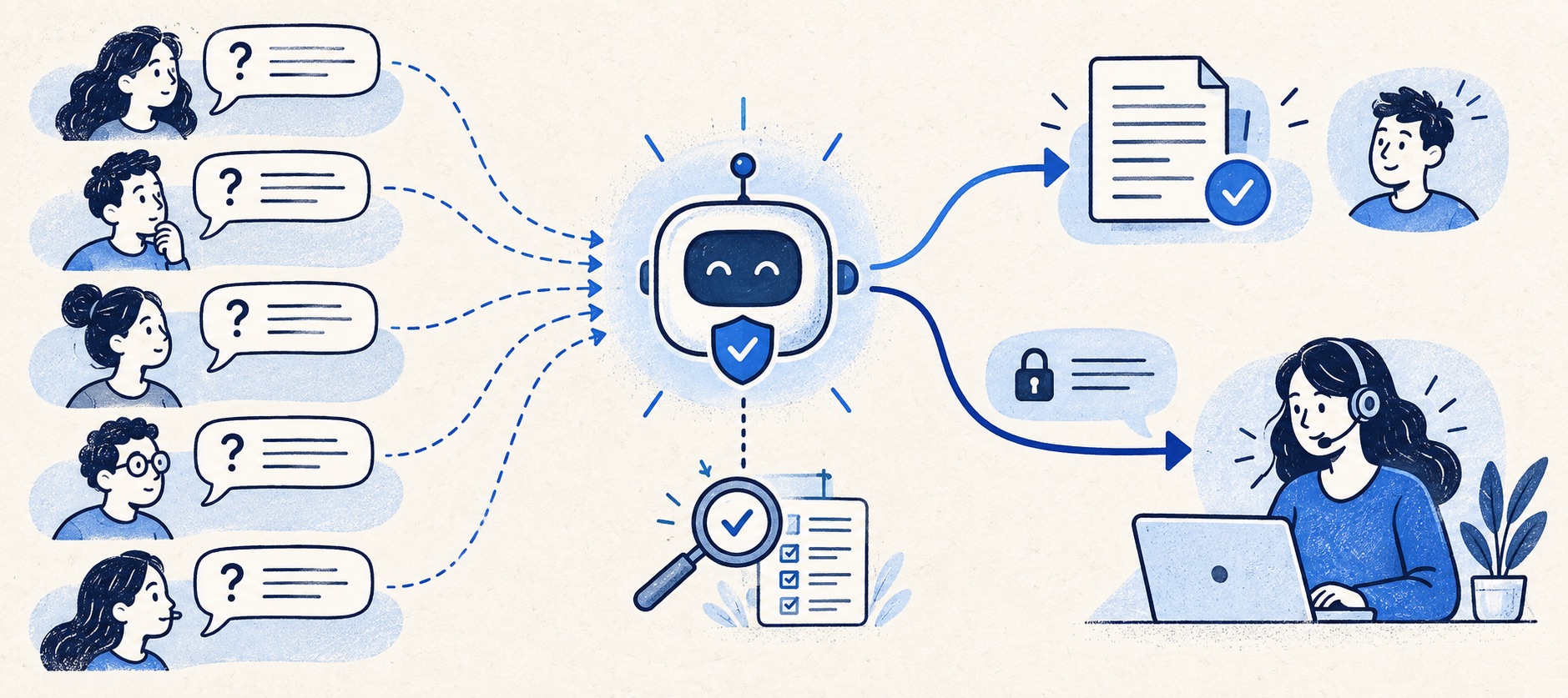
Separate AI draft assistance from autonomous customer-facing answers and actions.
[object Object]
Require source control, human handoff, auditability and a repeat-contact check before scaling.
Product shortlist
AI-capable support products to evaluate
The cards identify relevant providers, not a promise that every AI feature is in the displayed entry plan. Verify the required allowance and approval workflow.

Tidio
Best for: Small online businesses wanting website chat, ticketing, flows and optional AI in one workspace
A chat-first support workspace with a free 50-conversation monthly allowance, ticketing and separately metered Lyro AI and Flows options.
Free for 50 conversations/monthStarter from $24.17/month annually for 100; checked September 2026
Useful strengths
- Permanent free customer-service allowance
- Shopify app, chat and ticketing in one workspace
Watch for
- Human conversations have a monthly quota
- Lyro AI and Flows have separate allowances and charges
- Free tier
- Conversation-volume pricing
- Optional AI agent

Gorgias
Best for: Online shops that need order context and ecommerce actions inside support conversations
Unlike per-seat tools, Gorgias prices its help desk by billable ticket volume. Its strongest case is the depth of its Shopify and ecommerce workflow integrations.
$10/month for 50 ticketsStarter includes 3 agent seats; checked September 2026
Useful strengths
- Deep Shopify order context and actions
- Costs scale by tickets rather than only by agent seats
Watch for
- Overages and AI resolutions need modelling
- Entry plan is email-only and has limited operations features
- 7-day trial
- Shopify-focused
- Ticket-volume pricing

Freshdesk
Best for: Growing teams that need proper ticketing, self-service, automation and reporting
A broad email-first help desk with ticketing, a shared inbox, a customer portal, knowledge base and out-of-the-box reporting on its entry paid plan.
$19 per agent/monthGrowth, billed annually; checked September 2026
Useful strengths
- Ticketing, shared inbox and knowledge base on Growth
- Clearer route into routing, SLAs and custom reporting
Watch for
- Omnichannel needs differ from the email-first Freshdesk plan
- AI and connector usage can add cost
- Free trial
- Email-first help desk
- Per-agent pricing

Zendesk
Best for: Teams that expect multiple channels, mature routing and increasing operational complexity
The Support Team plan supplies core email ticketing, routing, analytics and automations. The broader Suite adds live chat, messaging, telephony and a knowledge base.
£15 per agent/monthSupport Team, paid yearly; checked September 2026
Useful strengths
- GBP pricing and a clear entry ticketing plan
- Strong upgrade path for multichannel operations
Watch for
- Suite Team rises to £45 per agent/month
- Small teams may buy more process than they need
- 14-day trial
- GBP pricing available
- Per-agent pricing

HelpDesk
Best for: Small teams that want ticketing, website chat and useful automation without an enterprise platform
A focused support workspace combining ticketing, a shared inbox, website chat, messaging channels, automation and reporting in one entry plan.
$19 per user/monthEssential, billed annually; checked September 2026
Useful strengths
- Ticketing, website chat and messaging channels on Essential
- 14-day trial without a credit card
Watch for
- There is no permanent free plan
- Extra AI resolutions can add usage cost
- 14-day trial
- Email, chat and messaging
- Per-user pricing

HubSpot Service Hub
Best for: Businesses that want support, sales and marketing activity on one customer record
Free tools cover basic ticketing, inbox and live chat. The dedicated advanced help-desk workspace, knowledge base, SLAs and deeper routing are concentrated in Professional and Enterprise.
Free for up to 2 usersProfessional from $90/seat/month annually plus onboarding; checked September 2026
Useful strengths
- Support history beside CRM, sales and marketing data
- Free entry tools and a large integration marketplace
Watch for
- Advanced help desk features require a large price jump
- Professional has mandatory onboarding cost
- 14-day trial
- CRM-connected service
- Two users on free tools
“AI customer support” now describes several different purchases. One product drafts a response for an agent to approve. Another answers a customer from a help centre. A more ambitious agent may look up an order or take an action. Treating those capabilities as one feature makes both price comparisons and risk controls meaningless.
Our shortlist is organised by the support problem each tool can plausibly solve for a small UK team, not by vendor claims about an automation percentage. This guide uses current provider pricing and feature documentation. Commercial details were checked September 2026.
Begin with the job, not the model
There are three useful starting jobs. First, reduce agent effort on repetitive but human-owned tickets through summaries, tagging and draft replies. Second, answer approved, low-risk questions automatically from maintained content. Third, complete a tightly controlled action such as checking order status or collecting information before a person takes over.
Write ten real recent contacts in each category. Mark what data the answer requires, the financial or privacy consequence of getting it wrong, and the point where the conversation must go to a human. A bot can confidently answer “What are your opening hours?” while the same confidence on a disputed refund is dangerous. The tool should be selected after this map exists.
Where the products fit
Tidio is a reasonable chat-first experiment. It includes website chat and ticketing, while Lyro AI can answer from supplied knowledge. Its initial 50 free Lyro conversations are lifetime, not a monthly renewable allowance. Human-handled conversations and Flows use have other quotas. It suits a smaller operation that can test a bounded set of questions and monitor all three meters.
Gorgias is most relevant when customer service is tied to an online store. Its AI Agent is designed around ecommerce requests and is charged by automated outcome alongside the volume-priced help desk. A Shopify shop should test whether it can answer policy questions and use order information safely, then confirm what counts as a billable resolution and what happens after a human handoff.
Freshdesk Omni provides a wider help-desk and multichannel context. Its current Growth pricing page lists Freddy AI Agent with an initial session allowance and additional sessions as an add-on. Do not substitute the cheaper email-first Freshdesk price when budgeting an omnichannel AI implementation. A team already using Freshdesk should check its exact entitlement before considering a platform change.
Zendesk is a stronger candidate for more complex routing, knowledge and governance. It prices AI-agent usage around automated resolutions, while Suite Team is the relevant starting point for messaging and a help centre. Its wider service features can be useful, but the implementation burden may outweigh the benefit for a tiny queue with only a few safe questions.
HelpDesk offers a focused per-user support workspace with included AI Agent resolutions on its published plans. Essential lists ten monthly resolutions; Growth lists more and adds richer team capability. It can make sense when a simple ticket-and-chat queue is the main job. Check additional-resolution packs and whether the AI outcome definition matches the actual pilot workload.
HubSpot Service Hub is most compelling when support already relies on the CRM record. Its Customer Agent is linked to Professional-level access and HubSpot Credits, with onboarding cost in the wider package. That is not an economical way to buy a standalone chatbot, but it may be strategically useful when sales, marketing and support share customer history.
Compare usage units honestly
A “conversation” in one product may count whenever an AI replies; a “resolution” elsewhere may require the AI to complete the issue without escalation. A session can include a different amount of interaction, and a credit system adds another conversion step. Neither a raw price per unit nor a vendor-reported resolution rate can be compared until the denominator is clear.
Build a scenario table with expected monthly contacts, share eligible for automation, share actually resolved without repeat contact, AI usage units, human contacts and peak-month demand. Ask each provider to classify the same ten example interactions. Include the case where a bot answers, the customer returns, and an agent finishes the work.
Use the published pricing calculator or a written quote for the exact plan. Include seats, channels, knowledge-base tier, integrations, usage packs, tax and implementation time. A low AI-unit charge can sit on an expensive underlying service platform; a generous initial allowance can disappear once the trial or lifetime pool is exhausted.
Knowledge quality is the real product input
An AI agent cannot be more reliable than its authorised sources. Identify who owns returns, shipping, warranty, billing and technical articles. Set a review date and approval route for changes. Exclude outdated promotions and internal notes that should not be shown to customers. A knowledge-base page that contradicts a checkout policy is an operational defect before it is an AI defect.
Test paraphrases, typos, incomplete details and policy exceptions. Ask the assistant to explain its source when possible. Keep a record of answers that were wrong, unhelpful or escalated, and fix the underlying content before increasing the automated share. Restrict actions that can change an account or move money until permissions, identity checks and rollback are understood.
Human handoff must be designed, not assumed
At escalation, a person needs the question, relevant customer context, what the AI has already said, and any action attempted. The customer needs to know whether someone is now handling the case and when to expect a reply. If the system creates a fresh ticket with no transcript, the automation has shifted work rather than removed it.
Specify triggers: low confidence, an explicit request for a person, repeated failed answer, complaint, suspected fraud, high-value order and time-sensitive change. Review how after-hours escalation works. A bot available all night cannot make a promise that nobody is scheduled to fulfil.
Pilot scorecard
Use a limited question set for two weeks. Score answer accuracy, correct escalation, customer effort, repeat contact, time saved, cost per correct resolution and the ease of updating knowledge. Sample both successful and unsuccessful transcripts. Keep a holdout route handled by humans so the team can compare outcomes without mistaking a changed channel mix for improvement.
The right first tool is the one that makes a safe, measurable improvement to a real queue. For a Shopify store that may be Gorgias; for a chat-led startup, Tidio; for broader service operations, Freshdesk Omni or Zendesk. If the knowledge and handoff foundations are not ready, start with a simpler rule or article instead of paying for an autonomous answer.
Sources
- Tidio pricing and AI allowances
- Gorgias pricing and AI Agent
- Freshdesk Omni pricing and Freddy sessions
- Zendesk UK pricing and AI-resolution definition
- HelpDesk pricing and included AI resolutions
- HubSpot Service Hub pricing and Credits
All plan facts come from provider sources. Product-fit conclusions are Support Sorted's editorial judgement.
Frequently asked questions
Questions readers ask before choosing
What is the best AI customer-support software for a small business?
It depends on the existing channel and workflow. Tidio is a manageable chat-first experiment, Gorgias has an ecommerce focus, and Freshdesk Omni or Zendesk fit broader service operations. Choose by a controlled test of accurate answers and safe handoff, not a generic ranking.
Is an AI agent the same as an agent copilot?
No. A copilot assists a human with summaries or draft replies. An AI agent can answer customers or act without a human approving every response. The latter needs stronger knowledge, permission and escalation controls.
Can AI customer support replace all agents?
No sensible small-team plan should assume that. Start with repeatable, documented requests and retain a human route for uncertainty, complaints, identity questions and exceptions. Measure whether automated interactions cause repeat contact.
How should AI support costs be compared?
Estimate the base seats or plan, included usage, extra AI sessions or resolutions, connected-system costs and the work needed to maintain knowledge. Compare cost per correctly resolved request using each provider's billing definition.