
SaaS startup buying guide
Help desk software for SaaS startups
Choose support software for a SaaS startup by testing bug escalation, onboarding questions, account context, self-service and the cost of scaling beyond email.
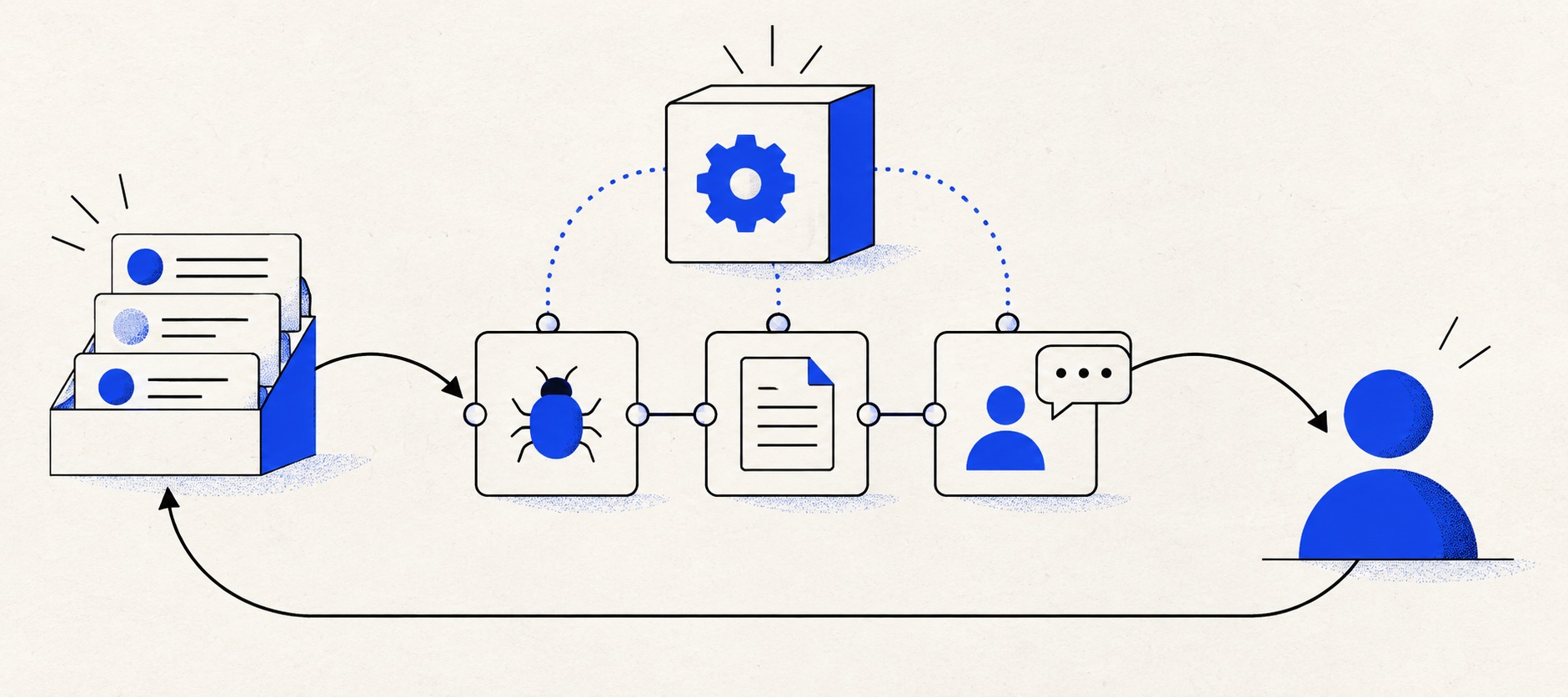
Test the handoff from a customer ticket to a product bug and back to the customer.
Keep onboarding knowledge and known-issue articles owned and current.
Price the plan that contains the needed portal, routing and reporting, not only the entry seat.
Product shortlist
Five credible SaaS support paths
Compare collaboration, knowledge and integration needs before choosing an entry tier.

Freshdesk
Best for: Growing teams that need proper ticketing, self-service, automation and reporting
A broad email-first help desk with ticketing, a shared inbox, a customer portal, knowledge base and out-of-the-box reporting on its entry paid plan.
$19 per agent/monthGrowth, billed annually; checked September 2026
Useful strengths
- Ticketing, shared inbox and knowledge base on Growth
- Clearer route into routing, SLAs and custom reporting
Watch for
- Omnichannel needs differ from the email-first Freshdesk plan
- AI and connector usage can add cost
- Free trial
- Email-first help desk
- Per-agent pricing

HelpDesk
Best for: Small teams that want ticketing, website chat and useful automation without an enterprise platform
A focused support workspace combining ticketing, a shared inbox, website chat, messaging channels, automation and reporting in one entry plan.
$19 per user/monthEssential, billed annually; checked September 2026
Useful strengths
- Ticketing, website chat and messaging channels on Essential
- 14-day trial without a credit card
Watch for
- There is no permanent free plan
- Extra AI resolutions can add usage cost
- 14-day trial
- Email, chat and messaging
- Per-user pricing

Zendesk
Best for: Teams that expect multiple channels, mature routing and increasing operational complexity
The Support Team plan supplies core email ticketing, routing, analytics and automations. The broader Suite adds live chat, messaging, telephony and a knowledge base.
£15 per agent/monthSupport Team, paid yearly; checked September 2026
Useful strengths
- GBP pricing and a clear entry ticketing plan
- Strong upgrade path for multichannel operations
Watch for
- Suite Team rises to £45 per agent/month
- Small teams may buy more process than they need
- 14-day trial
- GBP pricing available
- Per-agent pricing

HubSpot Service Hub
Best for: Businesses that want support, sales and marketing activity on one customer record
Free tools cover basic ticketing, inbox and live chat. The dedicated advanced help-desk workspace, knowledge base, SLAs and deeper routing are concentrated in Professional and Enterprise.
Free for up to 2 usersProfessional from $90/seat/month annually plus onboarding; checked September 2026
Useful strengths
- Support history beside CRM, sales and marketing data
- Free entry tools and a large integration marketplace
Watch for
- Advanced help desk features require a large price jump
- Professional has mandatory onboarding cost
- 14-day trial
- CRM-connected service
- Two users on free tools

Zoho Desk
Best for: Budget-conscious teams and businesses already using the Zoho ecosystem
The free edition covers three users and email ticketing. Paid tiers add broader messaging, knowledge-base, reporting, automation and telephony capabilities in stages.
Free for 3 usersPaid plans vary by selected billing currency; checked September 2026
Useful strengths
- Three-user free edition
- Broad channel and Zoho integration range
Watch for
- Plan and currency selectors make budgeting less immediate
- Live chat and advanced routing are plan-dependent
- 15-day trial
- Free edition
- Three users on free plan
A SaaS startup's support queue is also a source of product evidence. Repeated setup questions may reveal confusing onboarding; bug reports may identify a release problem; account questions may show a gap between the sales promise and the product. A help desk should preserve those signals while giving each customer a dependable answer.
The first purchase should be proportionate. A handful of founders can manage support through email for a time. Once several people answer customers or technical issues need a product-team handoff, a ticket system becomes a useful shared record. Choose one that can grow without forcing the startup to imitate a large enterprise service desk.
Quick shortlist
| Product | Best SaaS use | Starting point | Likely upgrade question |
|---|---|---|---|
| Freshdesk | Email, portal and knowledge | Growth: $19/agent/month annually | Advanced routing and reports |
| HelpDesk | Focused early queue | Essential: $19/user/month annually | Rules and operational depth |
| Zendesk | Maturing multichannel support | UK Support Team ticketing entry | Suite for broader channels |
| HubSpot Service Hub | Onboarding tied to CRM | Free service tools available | Advanced workspace tier |
| Zoho Desk | Low-cost ticketing start | Free for up to three users | Edition and user boundaries |
The products serve different starting positions. A CRM-led B2B startup may value account history more than a ticket portal. A self-serve product with many repeat setup questions may gain more from a knowledge base. Treat the plan shown here as an entry reference, not a claim that every SaaS workflow is included.
Map the support-to-product loop
Define four outcomes for an incoming case: answer now, add or improve a help article, investigate a defect, or pass commercial context to the account team. The help desk should record which outcome happened and who owns the next customer update. This avoids the common situation where engineering fixes a bug but the reporting customer never hears back.
Keep the customer ticket separate from the engineering issue. One defect may affect many customers, and the product team may use its own tracker. Link records where possible and maintain a human owner in support. Test whether the chosen integration exposes status without leaking internal developer notes to customers.
Review recurring contact reasons each week. If several customers ask how to invite a colleague, the product team may need to improve the interface while support publishes a clearer article. Software helps only if someone acts on the pattern.
Freshdesk: balanced ticketing and self-service
Freshdesk Growth includes an email-first shared inbox, portal, knowledge base and standard analytics. For a SaaS startup, that is a practical combination: answer a ticket, publish a repeatable solution and watch whether the same question declines. Its annual-billing reference is $19 per agent monthly.
Freshdesk also offers integrations for collaboration and issue workflows. Verify the exact integration you use with a real bug. Create a customer ticket, link or pass the underlying issue, then close the loop with an update. Check whether the product-team collaborator needs a paid agent seat or a higher plan.
Pro adds more advanced routing and custom reports. A startup with several product lines or contractual service levels may reach that boundary early. A small self-serve business may remain on Growth longer. The right price depends on the first complete workflow, not the number of features on the homepage.
HelpDesk: an early-stage queue without excess setup
HelpDesk offers a contained workspace for ticketing, prepared replies and internal collaboration, with website chat available. It suits founders who want to stop answering from personal inboxes but do not yet need a complex portal or many service policies.
Essential is listed at $19 per user monthly on annual billing. Start a trial with a real support address and one shared status model. Ask each person who answers customers to find a past interaction, leave a private note and hand a case over. The trial should reveal whether the focused surface genuinely saves time.
Check the rule allowance and the path to richer automation. A SaaS queue often develops conditions for plan, severity, language, customer tier and product area. Those can exceed a small entry allowance. Write the rules before configuring them so the upgrade is visible.
Zendesk: room for a formal service function
Zendesk becomes attractive as channels, service commitments and support roles grow. Its Support Team plan provides a ticketing entry route in the UK, while the Suite range covers broader service requirements. A startup should price the edition that includes its actual channels and self-service needs.
The question is whether the company is ready to operate that depth. Build one realistic workflow in a trial: a bug reported by email, an urgent case from chat, a help-centre article and a service report. If the resulting configuration is understandable to a new agent, the platform may provide a durable growth path.
If the business is still answering twenty uncomplicated emails each week, Zendesk may be more administration than it needs. Future potential alone does not justify unused process today.
HubSpot and Zoho Desk: account context or budget
HubSpot Service Hub is relevant when onboarding, renewals and customer support rely on the same account history. The CRM connection can help a support agent understand what was promised and who manages the relationship. Free service tools provide a starting point, but the advanced help desk workspace and more developed service features require paid tiers.
Zoho Desk's free edition supports up to three users and can establish a shared ticket queue for a small founder-led team. Its paid editions expand capacity and capability. If the startup already uses Zoho CRM or other Zoho tools, the ecosystem may reduce duplication; verify the exact integration and edition.
Neither should be chosen only because it can create tickets. Choose HubSpot when the shared CRM record is a measurable benefit, and Zoho when a value-led path covers the actual ticketing process.
Onboarding knowledge that stays useful
Begin with a short collection: first login, inviting teammates, billing basics, the two most common setup errors and how to contact support. Use customer language in headings and show a clear last review month. A knowledge base full of outdated release screenshots can create more tickets than it prevents.
Assign an owner to each article. When a release changes a step, update the article as part of the release checklist. Link articles from support replies, then watch whether customers still reopen the case. That provides a better signal than counting page views alone.
For sensitive account tasks, do not publish a shortcut that bypasses verification. A good article can explain the process while reserving identity checks for a secure support flow.
Channels, incidents and service promises
Email is a sensible default because it gives a traceable asynchronous record. Live chat can help a trial user through setup, but only if it is staffed. In-app support may be useful when it can carry account and product context safely into the ticket. Add channels in the order customers actually use them.
Treat incidents differently from routine requests. Publish one route for widespread outages and a clear update location. A help desk can track individual affected customers, but it should not be the only source of an incident announcement. Assign an incident owner and a separate owner for customer follow-up.
Define response targets by business hours and customer promise. Do not advertise 24-hour support because a chatbot is always visible. Test an enquiry arriving before a weekend and one from a customer on a different plan.
Buying trial and scale calculation
Create ten representative cases: onboarding confusion, failed login, billing change, feature request, product defect, incident report, account cancellation and a repeat customer. Ask support and a product teammate to complete the linked work. Record where context was copied manually and whether the customer was updated after resolution.
Budget current agents, a doubling of the team, advanced plan triggers, knowledge maintenance, integrations and optional AI usage. Annual contracts can be sensible, but only after the working plan is verified. Check data export before importing all historical cases.
Final recommendation
Choose Freshdesk for an email-and-knowledge operation, HelpDesk for a focused early queue, Zendesk for a maturing service function, HubSpot for CRM-connected onboarding or Zoho Desk for a budget-conscious start.
The best SaaS help desk does two jobs at once: it keeps a specific promise to the customer and gives the product team usable evidence about what customers struggle to do.
Sources
- Freshdesk pricing
- Freshdesk integrations
- HelpDesk pricing
- Zendesk UK pricing
- HubSpot Service Hub
- Zoho Desk pricing
Provider facts come from official sources. Product-fit conclusions are Support Sorted's editorial judgement.
Frequently asked questions
Questions readers ask before choosing
What should a SaaS startup look for in a help desk?
Clear ticket ownership, a useful customer record, a route to engineering, a maintained knowledge base and reporting on recurring issues. Live chat or AI should follow a proven support process.
Should bug reports become support tickets?
The customer conversation should remain a support ticket, while the product team may track the underlying defect in its own system. Link the two and assign responsibility for the customer update.
Is a knowledge base necessary at launch?
A small set of maintained onboarding and troubleshooting articles can help early customers, but a large empty portal is not necessary. Add articles for questions that recur and give each an owner.
When should a SaaS startup add live chat?
Add it when someone can staff the stated hours and the speed helps onboarding or adoption. Otherwise asynchronous email and a clear response promise may provide a better experience.