
Data protection buying guide
Help desk data-retention settings
Turn a justified customer-support retention schedule into help desk settings, covering tickets, attachments, exports, backups and account closure.
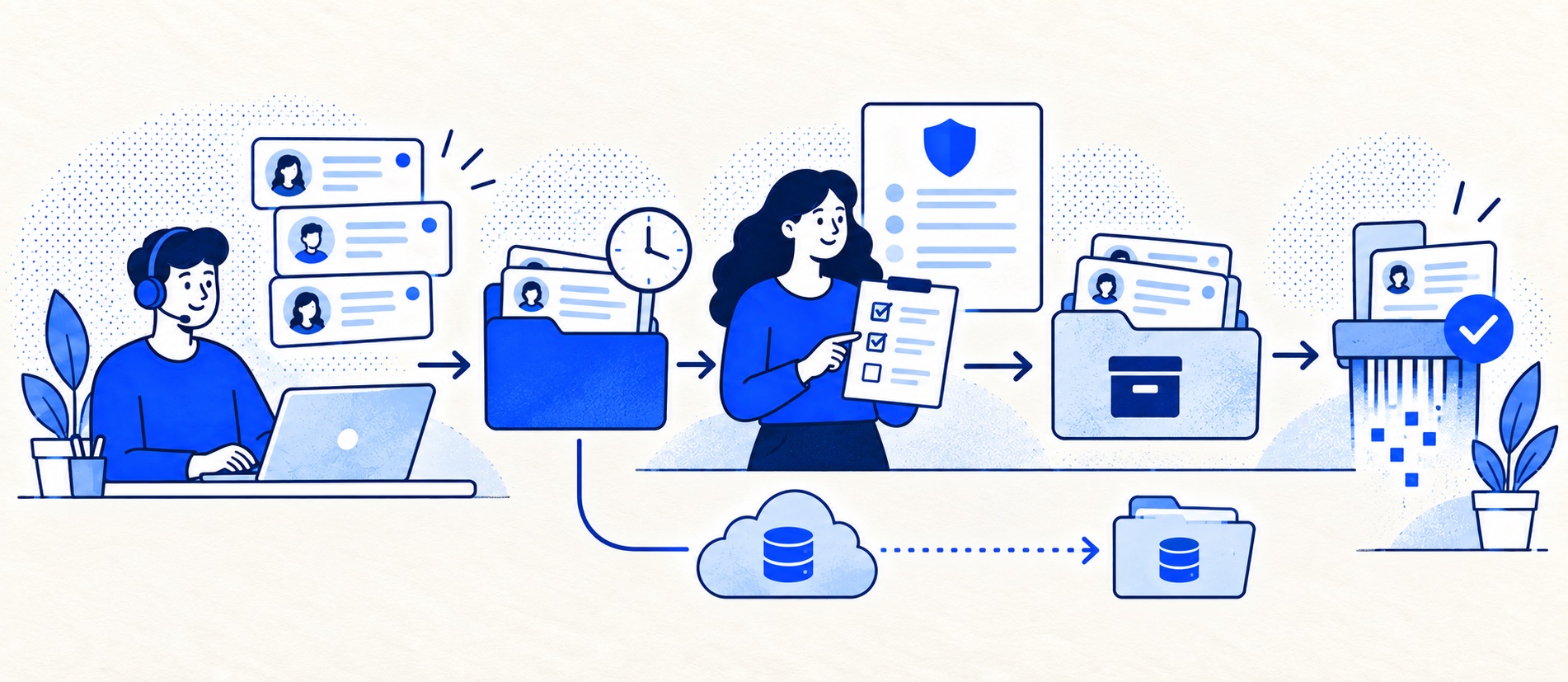
Separate operational cases, complaints, legal holds and analytics copies.
Test what deletion actually removes and when backups expire.
Assign an owner to review the schedule when products or obligations change.
Product shortlist
Retention controls to test
Verify deletion schedules, redaction, export and account-termination terms on the intended plan. A provider policy is not your own retention schedule.

Zendesk
Best for: Teams that expect multiple channels, mature routing and increasing operational complexity
The Support Team plan supplies core email ticketing, routing, analytics and automations. The broader Suite adds live chat, messaging, telephony and a knowledge base.
£15 per agent/monthSupport Team, paid yearly; checked September 2026
Useful strengths
- GBP pricing and a clear entry ticketing plan
- Strong upgrade path for multichannel operations
Watch for
- Suite Team rises to £45 per agent/month
- Small teams may buy more process than they need
- 14-day trial
- GBP pricing available
- Per-agent pricing

Freshdesk
Best for: Growing teams that need proper ticketing, self-service, automation and reporting
A broad email-first help desk with ticketing, a shared inbox, a customer portal, knowledge base and out-of-the-box reporting on its entry paid plan.
$19 per agent/monthGrowth, billed annually; checked September 2026
Useful strengths
- Ticketing, shared inbox and knowledge base on Growth
- Clearer route into routing, SLAs and custom reporting
Watch for
- Omnichannel needs differ from the email-first Freshdesk plan
- AI and connector usage can add cost
- Free trial
- Email-first help desk
- Per-agent pricing

Zoho Desk
Best for: Budget-conscious teams and businesses already using the Zoho ecosystem
The free edition covers three users and email ticketing. Paid tiers add broader messaging, knowledge-base, reporting, automation and telephony capabilities in stages.
Free for 3 usersPaid plans vary by selected billing currency; checked September 2026
Useful strengths
- Three-user free edition
- Broad channel and Zoho integration range
Watch for
- Plan and currency selectors make budgeting less immediate
- Live chat and advanced routing are plan-dependent
- 15-day trial
- Free edition
- Three users on free plan

HubSpot Service Hub
Best for: Businesses that want support, sales and marketing activity on one customer record
Free tools cover basic ticketing, inbox and live chat. The dedicated advanced help-desk workspace, knowledge base, SLAs and deeper routing are concentrated in Professional and Enterprise.
Free for up to 2 usersProfessional from $90/seat/month annually plus onboarding; checked September 2026
Useful strengths
- Support history beside CRM, sales and marketing data
- Free entry tools and a large integration marketplace
Watch for
- Advanced help desk features require a large price jump
- Professional has mandatory onboarding cost
- 14-day trial
- CRM-connected service
- Two users on free tools
A closed ticket is usually still a stored record. It may contain customer names, addresses, complaint details, internal notes and attachments long after the issue ended. A help desk therefore needs a planned lifecycle: what remains active, what is reviewed, what is kept for a justified purpose and what is erased or anonymised.
The ICO's storage-limitation guidance says the UK GDPR does not prescribe one period for personal data. The organisation should justify retention for its purposes, document standard periods where appropriate and review data it no longer needs. This page helps a buyer test whether a product can carry out that decision; it does not set the legally correct period for your business.
Separate record types before setting a timer
Routine questions, unresolved complaints, refund evidence and security incidents may need different treatment. Define categories that your team can actually identify, and note any other legal or contractual preservation duty. A blanket “delete all tickets after a year” rule could remove evidence still needed for an open complaint; an indefinite “keep everything” rule creates unnecessary exposure. Ask the responsible adviser to approve exceptions and holds.
Create a short schedule with data category, purpose, retention trigger, review or deletion action, owner and exception process. The trigger may be closure, last customer interaction, account termination or another event—choose it deliberately. The same customer may have several tickets with different purposes.
Test the full record, not only the ticket headline
Create a test customer with a message, private note, attachment, custom field and linked order. Search for that person, export the record, redact a sensitive detail and delete the test ticket using the plan's supported path. What remains in search results, reports, audit logs and linked systems? Who can perform the action, and can it be reversed? Confirm whether attachments and transcripts follow the same policy.
Zendesk's trust centre describes ticket and user deletion schedules and more advanced conditional retention on an add-on. Freshworks' data-storage documentation discusses active-account data and termination handling. Treat these as vendor-specific starting points: confirm current terms, edition and the meaning of deletion in a written answer.
Account for backups and exported copies
Deleting a record from the live inbox may not immediately remove it from disaster-recovery backups. Ask for the backup retention cycle, restoration safeguards and how deletion requests are handled after a restore. ICO encryption and backup guidance highlights both recovery and erasure considerations. Do not promise customers instant deletion from every backup unless the provider can support that statement.
Your own CSV exports, spreadsheets, screenshots and AI tools may outlive the help desk. Keep an inventory and apply the same purpose-based review. A clean vendor deletion feature does little if an uncontrolled export remains in a shared drive. Limit who can export, record why and remove copies when the purpose ends.
Prepare for migration and exit
Before importing historic tickets, filter out records that are no longer needed. At exit, ask how to export necessary open cases, how long the provider keeps the account after termination and when data becomes unrecoverable. Test that a sample export includes the context required to continue serving customers. Record the final deletion confirmation rather than assuming cancellation performs it.
Review the schedule after a new channel, AI feature, legal requirement or complaint type changes the data you hold. A retention setting is not “set and forget”; it must continue to reflect the reason you keep the information.
Sources
- ICO: storage limitation
- ICO: encryption and backup scenarios
- Zendesk Trust Center
- Freshdesk data-storage and security information
This is editorial buyer guidance, not legal advice or a recommended retention period.
Frequently asked questions
Questions readers ask before choosing
How long must we keep support tickets under UK GDPR?
There is no single UK GDPR period for all tickets. Your organisation must justify retention for its purposes and review or delete data when it is no longer needed, subject to other applicable obligations.
Is closing a ticket the same as deleting it?
No. Closed tickets usually remain searchable until a separate deletion or retention process applies. Test the product's actual behaviour.
Does deleting a ticket remove it from backups immediately?
Not necessarily. Ask how backups are retained, isolated and expired, and whether restored copies would reintroduce deleted data.
Should we import all old email history into a new help desk?
Usually import only history that has a clear support or legal purpose. Review age, sensitivity and retention before migration.